The phonebook allows you to create contacts for SIP and also add general information to your contacts. You can start SIP calls from here directly or use the SIP Calls widget.
See the Guide SIP Configuration for an in-depth explanation of how to configure SIP.
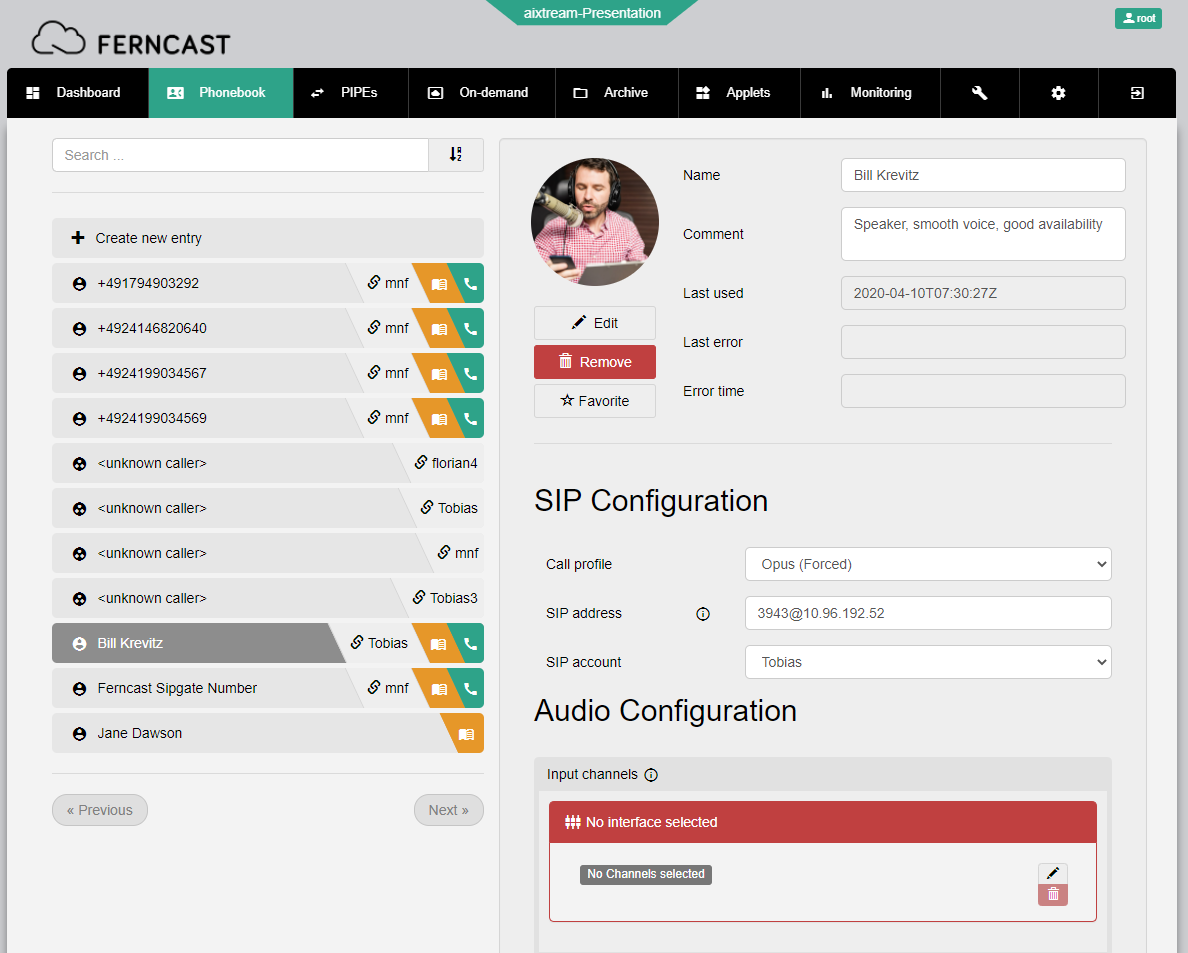
| Element | Description |
| ⇐ Left side | |
| Search field and sorter | Filters the contacts with a full text search of the entered text (including searching for matches from the contact data). The sorting button changes the sequence of the listed contacts (alphabetical, up or down). |
| Create new entry | Select this entry to perform the initial configuration of a new SIP contact. After clicking +Create at the bottom, the new contact is created and can be found in the List of available phonebook entries. |
| List of available phonebook entries | Lists all created SIP contacts. Click on an entry to see and configure that SIP contact. |
| ⇒ Contact details | |
| Edit | Opens file browser to select and upload a profile picture for the contact. |
| Favorite | Sets the contact as a favorite. Favorites always appear at the top of the list of contacts. |
| Contact information |
In these text fields various pieces of contact information can be recorded.
|
| Last used | Date and time of the last time you had a call with this contact. |
| Last error | The last error logged in regards to this contact (e. g. unexpected call drops). |
| Error time | Date and time of the last error. |
| SIP Configuration | |
| Call profile | Dropdown for selecting which Call Profile to use with this contact. |
| SIP address | The full SIP address of the contact, including registrar. |
| SIP account | Dropdown for selecting from which SIP account to call the contact. This list is based on the SIP Accounts configured on the system. |
| DTMF Init Sequence | Configuration of DTMF sequence sending (using SIP INFO layer) |
| Digits | Sets the DTMF sequence sent when the contact is called. |
| DTMF init delay | Sets the delay between call start and DTMF sequence being sent. |
| DTMF init mode | Dropdown for selecting in which call directions the DTMF sequence is triggered. |
| Audio Configuration | |
| Input channels | Sets which audio input channels are used for SIP calls with this contact. Requires a connected audio interface with selectable channels. |
| Output channels | Sets which audio output channels are used for SIP calls with this contact. Requires a connected audio interface with selectable channels. |
| Sending pipe | Dropdown for selecting which Pipe Template is used as input for SIP calls with this contact. It only displays valid Pipe Templates with a SIP sink element. |
| Receiving pipe | Dropdown for selecting which Pipe Template is used as output for SIP calls with this contact. It only displays valid Pipe Templates with a SIP source element. |