In this menu you can create and configure Call Profiles.
| L | SIP Configuration guide |
| See this guide for more details on Call Profiles in action. |
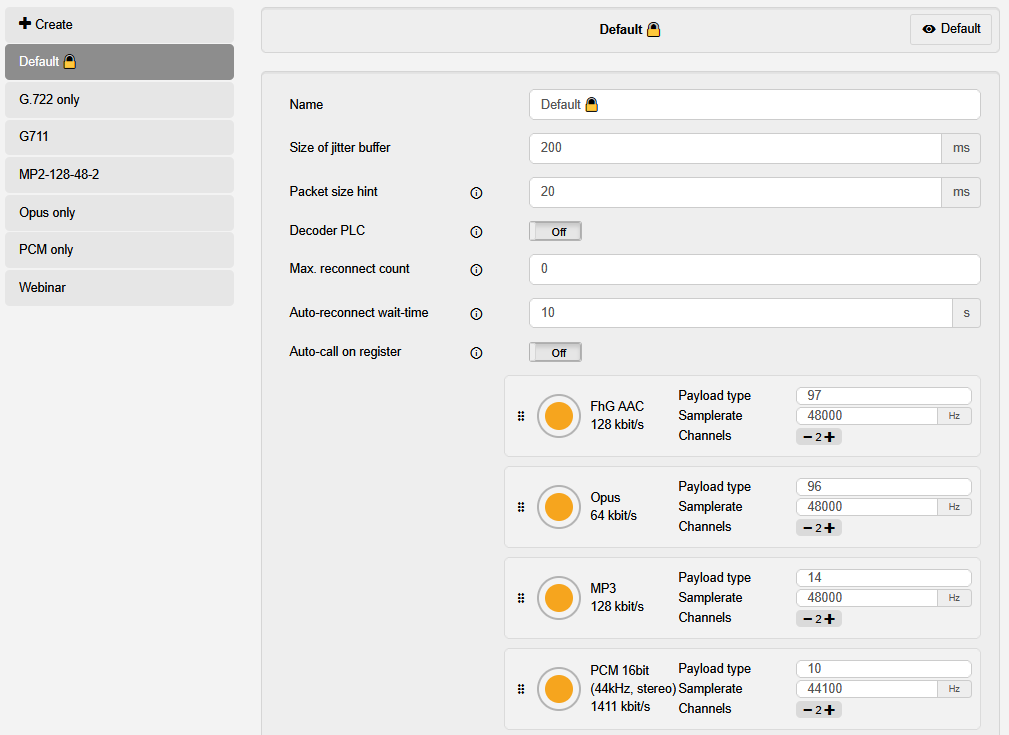
| Element | Description |
| ⇐ Left side | On this side is the option to + Create a new Call Profile and the List of available call profile entries. |
| + Create | Select this entry to create a new call profile. |
| List of available call profile entries | Lists all created call profiles. Select one to see and change the selected call profile. |
| ⇒ Call profile settings | On this side, you see all settings available for the call profile configuration. The displayed settings are for the currently selected call profile. |
| Name | Sets the name for the call profile. Note: Ensure this is a recognizable name, as this is how the call profile will be identified in other menus and widgets. |
| Size of jitter buffer | Sets the size of the jitter buffer in milliseconds. Increasing the buffer size might help if you experience a lot of dropouts during calls. |
| Packet size hint | |
| Decoder PLC |
Toggles whether decoder-side packet loss concealment is activated ("On") or not ("Off"). See here for more details on PLC. |
| Max. reconnect count | Sets the maximal number of reconnect attempts after an error which caused a disconnect. |
| Auto-reconnect wait-time | Sets the time in seconds how long the systems waits before attempting a reconnect. |
| Auto-call on register | SIP only: Toggles whether calls that were active before the last deregistration should automatically be reconnected after the system registers anew. |
| List of chosen encoders |
All encoders set as options for this call profile. This is a priority list going from top to bottom (i.e. the top encoder is chosen first during call negotiation, if the remote end rejects it, the next encoder down is tried, and so on.). Bitrate and other encoder-specific settings can be configured by clicking on the element after it has been added to the list. In addition, the following options are available:
|
| Pool of available encoders | All encoders unlocked on this system. By drag-and-dropping one into the List of chosen encoders, they are added to that list, and can then be configured further. |