The fernFM is an FM receiver for aixtream, developed by Ferncast. It receives FM radio programs from the air and makes their audio and metadata (RDS) available to aixtream. Connected to aixtream, it works like a USB audio interface, but is built with FM receiver components instead of conventional analog or digital audio components.
Typical use cases are:
- FM monitoring: 24/7 monitoring of the reception quality of FM programs, with automatic warnings when values leave a defined range.
- Format conversion: Re-using received FM programs in any format aixtream supports, for example turning FM programs into Icecast streams.
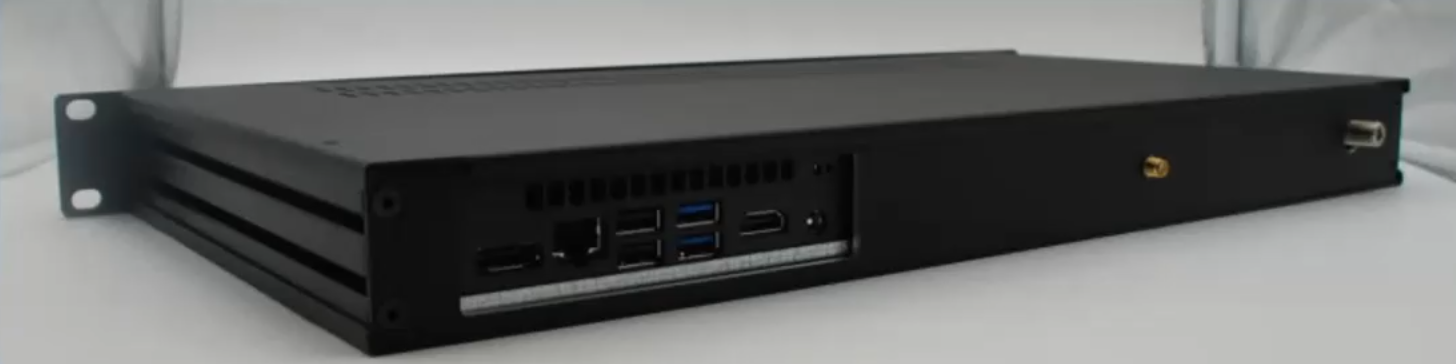
¶ Hardware overview
| Feature | Description |
|---|---|
| Chassis | 1HU 19" rack unit. |
| Receiver cards | 1 or 2 FM receiver cards. Each receiver card is a separate 4-channel module with its own serial number (e.g. “395F7B43”). aixtream shows each receiver card as its own module, e.g. in the Monitoring menu and in the Demux dropdown of the Data Watch Settings. |
| FM channels |
4 FM channels (programs) per receiver card, including audio and metadata (RDS). A fernFM with 2 receiver cards handles up to 8 channels. aixtream recognizes these as two separate 4-channel modules. |
| Reception monitoring | Measures the reception quality of each channel, e.g. signal strength, signal-to-noise ratio, stereo decoding and RDS (see fernFM tabs in the Monitoring menu). |
¶ Integrated and add-on solution
The fernFM is available in two versions:
| Version | Description |
|---|---|
| Integrated solution | The receiver cards and an ACS Mini (mini PC running aixtream) are combined in a single 19" chassis. The fernFM is a complete, standalone aixtream system. Connect it to your network and access it via the web UI (see Network access). |
| Add-on solution | The fernFM contains only the receiver cards and is connected via USB to an external computer running aixtream. |
¶ Using the fernFM in aixtream
aixtream detects a connected fernFM automatically. FM programs are received via a demux:
- Go to the Settings menu.
- Go to the Demux sub-menu and create a new demux with the format FernFM (autodetected).
- Add a new entry for each program you want to receive and enter its Frequency.
- Click on Save.
- Use the program in a PIPE, either via the Demux source element or by selecting the individual input via the Audio source element.
Note: The Audio source element only delivers a fernFM input if a working demux has been configured for this FM signal in the Demux menu.
| ! | Demux license module required |
| Demuxing FM signals requires the Demux license module (see License modules). Contact info@ferncast.com for an offer for the fernFM and the required licenses. |
¶ fernFM tabs in the Monitoring menu
If a fernFM is connected, the Monitoring menu shows additional tabs:
- System: The regular system monitoring (see Monitoring).
- FernFM [serial number]: One tab per receiver card, showing the FM statistics of its 4 channels.
- Data Watch Settings: Settings for automatic monitoring of the FM statistics.
¶ FM statistics
Each FernFM [serial number] tab shows the FM statistics of the receiver card as charts over time. Each program is shown in its own color (see legend below each chart).
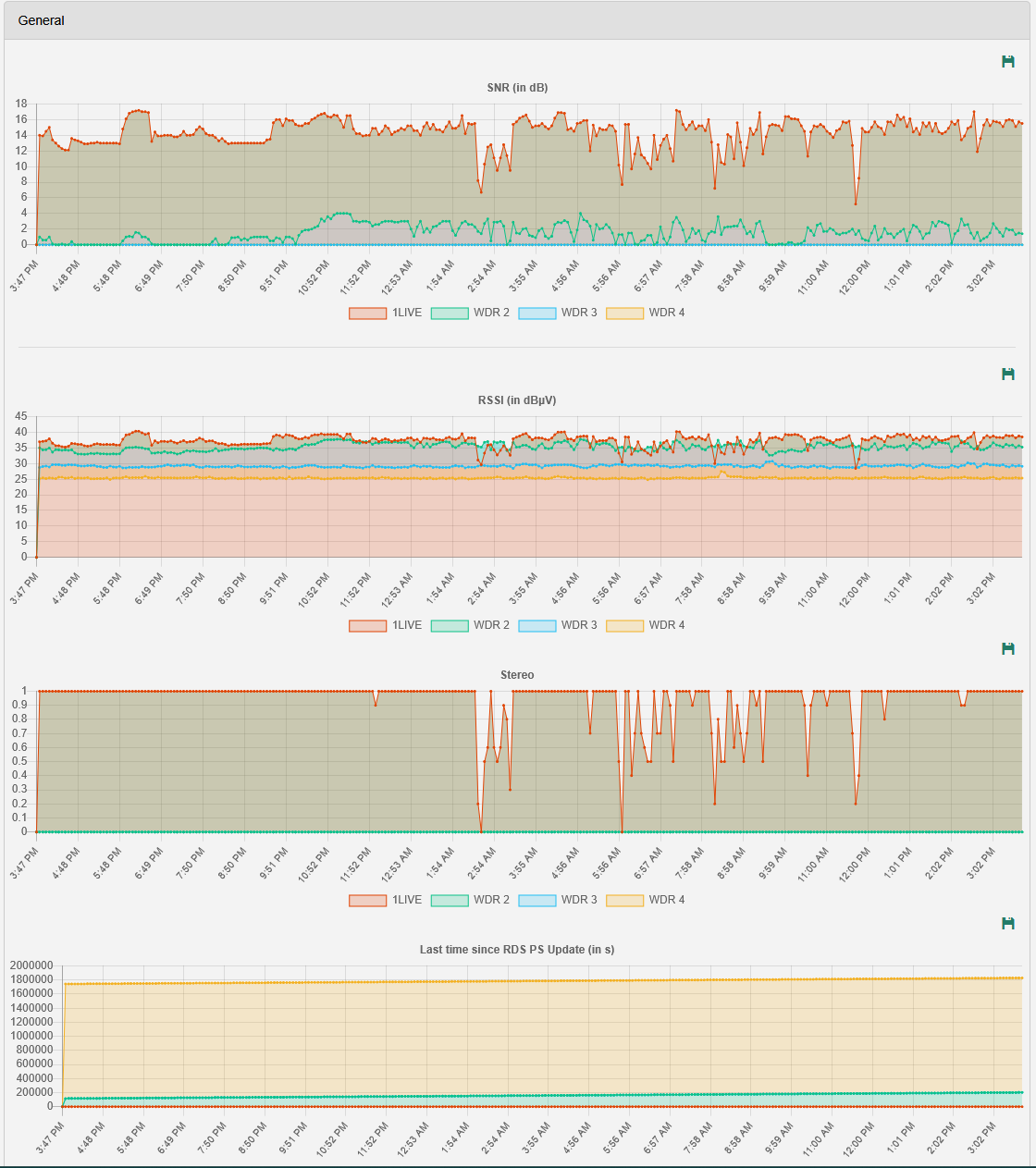
| Statistic | Description |
|---|---|
| SNR (in dB) |
Signal-to-noise ratio of the received signal in dB. Shows how far the wanted signal stands out from background noise. Higher is better. A low SNR results in audible noise. |
| RSSI (in dBµV) |
Received Signal Strength Indicator: the strength of the received signal at the antenna input in dBµV. Higher is better. A strong signal does not guarantee good reception if the SNR is low, e.g. due to interference. |
| Stereo |
Shows whether the stereo pilot tone is detected and the program is decoded in stereo.
Values between “0” and “1” result from the time scale of the chart: stereo reception was not stable during the displayed interval. Consider such values a sign of flaky reception. For the dataWatch, any value other than “1” counts as a loss of the stereo carrier. |
| Last time since RDS PS Update (in s) |
Time in seconds since the last update of the RDS Program Service name (PS, the station name shown on radio displays). Lower is better. A constantly rising value means no RDS data is being received for this program. |
|
Save button (floppy disk icon) |
Saves the chart as a PNG image file. |
¶ Data Watch Settings
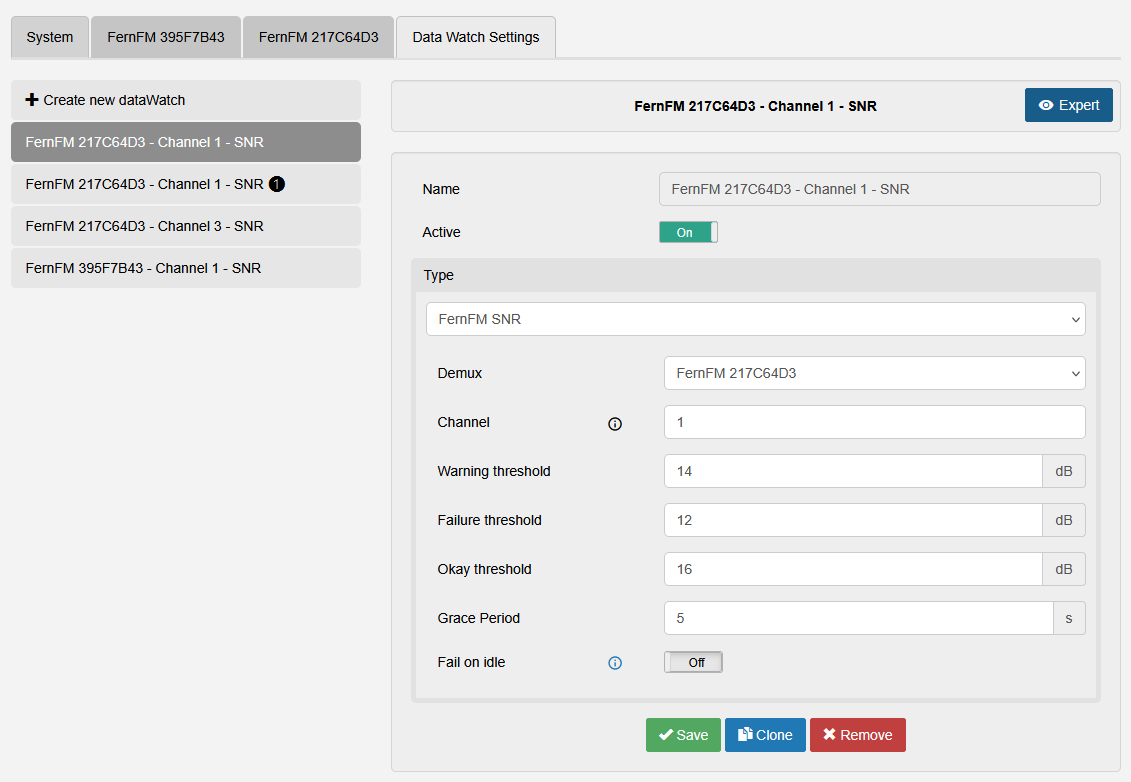
A dataWatch automatically monitors one FM statistic of one channel. If the value leaves the defined range, aixtream creates a warning or error event (see Event codes, codes 1601 to 1605). You can use these events to trigger automatic reactions with Applets, for example e-mail alerts or switching to a backup signal.
| ! | How the thresholds work |
|
The types FernFM SNR, FernFM RSSI and FernFM PS Update Time use three thresholds. Using SNR as an example (higher is better):
Because the Okay threshold is set above the warning threshold, short fluctuations around a threshold do not cause a constant change between warning and recovery. For statistics where lower is better (FernFM PS Update Time), the thresholds work the other way round: the value rises above the warning and failure thresholds and recovers when it falls below the Okay threshold. If a Grace Period is set, the value must stay beyond a threshold for this time before the event is created. FernFM Stereo has no thresholds: any value other than “1” is a loss of the stereo carrier. A warning is created after one Grace Period without recovery, an error after a second one. |
¶ Available settings per type
The settings of a dataWatch depend on the selected Type:
| Type | Monitors | Thresholds | Grace Period |
|---|---|---|---|
| FernFM SNR | Signal-to-noise ratio of one channel. | Yes, in dB | Yes |
| FernFM RSSI | Signal strength of one channel. | Yes, in dBµV | Yes |
| FernFM Stereo | Loss of the stereo carrier on one channel (any value other than “1”). | No | Yes |
| FernFM PS Update Time | Time since the last RDS PS update on one channel. | Yes, in s | No |
| Element | Description |
|---|---|
| This table lists the elements of the Data Watch Settings tab from left to right, top to bottom. | |
| ⇐ Left side | |
| + Create new dataWatch | Creates a new dataWatch. |
| List of dataWatches |
Lists all created dataWatches. Select one to see and change its settings. Note: A dataWatch marked with a number symbol (e.g. ❶) is a duplicate of another dataWatch, e.g. after a config import. |
| ⇒ dataWatch settings | |
| Expert | Toggles the Expert view on or off. The button is blue while the Expert view is on. |
| Name | Information field: Name of the dataWatch. It is generated automatically from demux, channel and type (e.g. “FernFM 217C64D3 - Channel 1 - SNR”). |
| Active | Activates (“On”) or deactivates (“Off”) the dataWatch. |
| Type |
Dropdown: Selects the value to monitor. The available settings change with the selected type (see Available settings per type).
|
| Demux | Dropdown: Selects the fernFM demux to monitor (see Demux). |
| Channel | Sets the channel of the demux to monitor, counted from “1” to “4”. |
| Warning threshold | Sets the value at which a warning is created. The unit depends on the selected Type (e.g. dB for FernFM SNR). Not available for FernFM Stereo. |
| Failure threshold | Sets the value at which an error is created. Not available for FernFM Stereo. |
| Okay threshold | Sets the value at which the monitored value is considered recovered. Not available for FernFM Stereo. |
| Grace Period |
Sets the time in seconds the value must stay beyond a threshold before an event is created. This prevents events caused by very short drops. For FernFM Stereo, any value other than “1” counts as a loss of the stereo carrier. If the carrier is not recovered within the Grace Period, a warning is created. If it is still not recovered after a further Grace Period, an error is created. Not available for FernFM PS Update Time. |
| Fail on idle | Toggle: Sets an alarm if the monitored value is not updated anymore (“On”), e.g. because the demux is not running. Default: “Off”. |
| ⇒ Buttons | |
| Save | Saves the dataWatch. |
| Clone | Creates a copy of the dataWatch, e.g. to monitor the same statistic for another channel. |
| Remove | Deletes the dataWatch. |