In this menu the demux of multiplexed audio sources is configured. This must be done before they can be used with the Demux source element. The following formats can be demuxed with aixtream:
- DAB
- DVB
- FM
- Multi-channel AES67 streams (AoIP)
- SDI
| E | Hardware requirements |
|
The following demux inputs require specialized hardware to be integrated into the aixtream system:
The following demux inputs only require a network port:
If you require specialized hardware for your use case, contact support@ferncast.de to receive help with making the right purchase. |
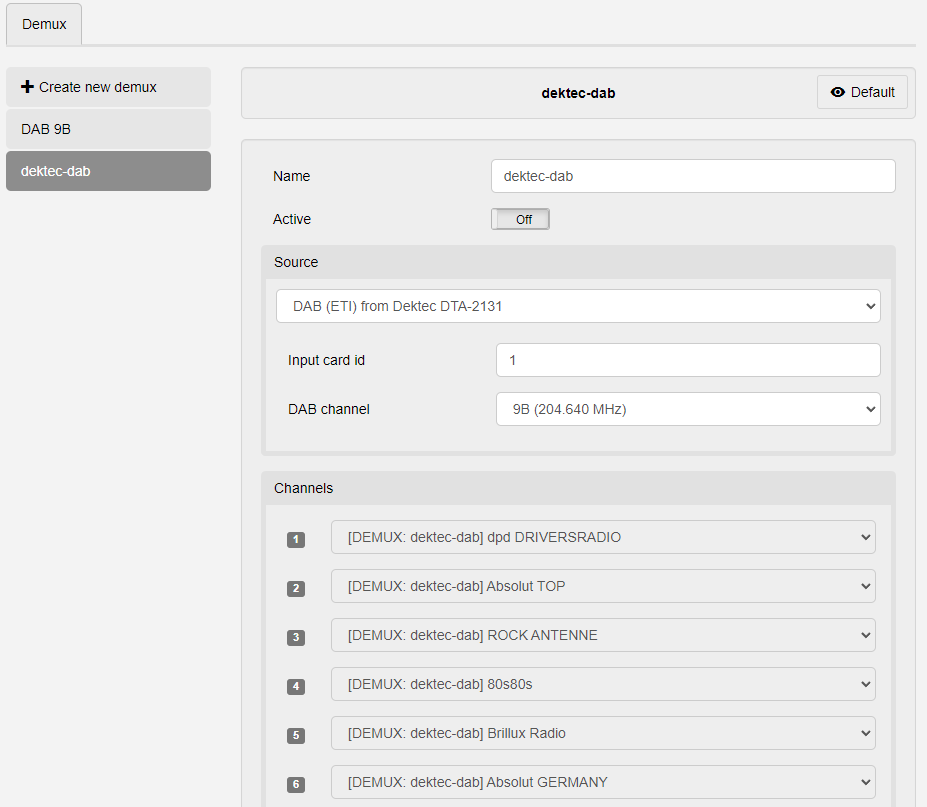
| Element | Description |
| ⇐ Left side | On this side is the option to + Create a new demux and the List of configured demuxes. |
| + Create new demux | Select this entry to create a new demux. |
| List of available demuxes | Lists all created demuxes. Select one to see and change the selected demux. |
| ⇒ Demux settings | On this side, you see all settings available for the demux configuration. The displayed settings are for the currently selected demux. |
| Name |
Sets the name for the demux. Note: Ensure this is a recognizable name, as this is how the demux will be identified in other menus and PIPE elements. |
| Archive | |
| Source |
Dropdown: Sets the format of the demux you want to configure. See tables below for the settings for each format. |
| Channels | Lists all the channels or programs found in the currently configured and selected demux. |
¶ DAB
¶ DAB from Dektec DTA-2131
| Element | Description |
| Input card id |
Sets which installed PCI card is used for this demux. Note: If you have only one card installed, this must always be “1”. |
| DAB channel | Dropdown: Selects the DAB channel frequency to scan for programs. |
¶ DAB (EDI/ETI) from UDP
| ! | Multicast sources |
| Only set a Multicast group and Multicast source if you want to receive a multicast stream. |
| Element | Description |
| Port | Sets the input port for the UDP stream. |
| Network Interface | Dropdown: Selects the network interface for receiving the UDP stream. |
| Multicast group | Sets the multicast group to join for receiving the UDP stream. |
| Multicast source | Sets the multicast source to join for receiving the UDP stream. |
¶ DAB (EDI/ETI) from SRT
| Element | Description |
| Port |
Sets the target port to stream to. Note: “7001” is the default SRT target port. |
| Host |
Determines whether caller or listener mode is used.
|
| Passphrase | Enables encryption. Set a passphrase to enable encryption. The communication partner must have the same passphrase set. |
¶ DAB (EDI/ETI) from file
| Element | Description |
| Filename | File browser: Selects a file from the Archive to use as EDI input. |
| Loop |
Sets the number of times the file playback is looped. c Note: “0” means infinite loops. |
¶ DVB
¶ DVB (MPEG TS) from UDP
| ! | Multicast sources |
| Only set a Multicast group and Multicast source if you want to receive a multicast stream. |
| Element | Description |
| Port | Sets the input port for the UDP stream. |
| Network Interface | Dropdown: Selects the network interface for receiving the UDP stream. |
| Multicast group | Sets the multicast group to join for receiving the UDP stream. |
| Multicast source | Sets the multicast source to join for receiving the UDP stream. |
¶ DVB (MPEG TS) from SRT
| Element | Description |
| Port |
Sets the target port to stream to. Note: “7001” is the default SRT target port. |
| Host |
Determines whether caller or listener mode is used.
|
| Passphrase | Enables encryption. Set a passphrase to enable encryption. The communication partner must have the same passphrase set. |
¶ FM
¶ FernFM (autodetected)
| Element | Description |
| Serial number | Information field: Shows the serial number of the connected fernFM system. |
| Channels | Lists all the channels or programs found. |
| New Entry | Accordion menu for creating a new input program. |
| Name | Information field: Name of the program. |
| Frequency | Sets the frequency to scan for radio activity. |
| User Name | Sets the user name for the input. |
| Statistics | Information fields, multiple: Shows various FM statistics, including SNR, RDS info, pilot information. |
¶ AOIP
¶ AoIP
| Element | Description |
| Session |
Dropdown: Selects the AES67/Ravenna stream to use as input. Note that this only shows AoIP streams that have been found in the network (by announcing themselves). If the desired AoIP stream is not found here, use the SDP field below to enter the AoIP stream's SDP. |
| SDP |
Selects an incoming AoIP stream based on its SDP (Session Description Protocol). Paste the entire SDP info from the sending system here. Note: A selected session (above) has priority over a manual SDP entry. Do not select a session if you wish to use custom SDP information. |
| Session name | Sets the name by which the session is found in the AES67 network. |
| Size of jitter buffer | Sets the jitter buffer in miliseconds (ms). |
| Multicast interface | Dropdown: Selects the network port to use for multicast communication. |
¶ RTP
| Element | Description |
| Sources | Options to sets up new and edit existing RTP inputs used in this PIPE. |
| Preferred group ID | |
| Active group ID | |
| Try other group IDs | |
| RTCP port | Information field: Shows the used RTCP port. |
| Connect RTCP | Toggles |
| Allocated port | Toggles |
| Size of jitter buffer | Sets the size of the jitter buffer in miliseconds. |
| Rebuffer input to | |
| Playout sync buffer | Enables distributed, synchronized playout. Buffer is set in miliseconds. |
| Decoder PLC | Toggles packet loss concealment during decoding “On” or “Off”. |
| Log RTP statistics | Toggles whether advanced RTP statistics are recorded ("On") or not ("Off"). |
| Call profile | Dropdown: Selects the Call profile to use. |
| SSRC locking | |
| SSRC | |
| RTCP Canonical Name (CNAME) |
Sets an RTCP Canonical Name, which is used as a unique identifier for an RTP endpoint. See here for more details. |
| Payload type ID | Information field: Shows the current payload ID when the PIPE is active. |
¶ SDI
¶ SDI from Dektec DTA cards
| Element | Description |
| Input card id |
Sets which installed PCI card is used for this demux. Note: If you have only one card installed, this must always be “1”. |
| Input port id |
Sets which port is used for the demux Note: If you have only one card installed, this must always be “1”. |