This widget allows you to control and monitor one or more file playlists you have set up via the PIPEs menu.
| ! | File Source required |
| Only PIPEs with a File source can be selected for monitoring via this widget. |
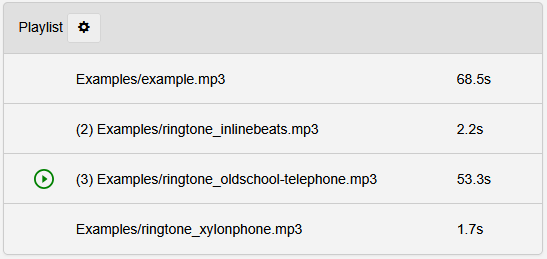
| Element | Description |
| ⇑ Gear icon |
Dropdown to select the PIPE of which the playlist is displayed.
|
| ⇐ Left side |
Indicator icon showing which track is currently playing. Clicking this icon stops the playlist. (See green play icon in the screenshot above.) |
| Center | The complete playlist by file path and name in order of playback. |
| ⇒ Right side | Length in seconds (s) for each file that is part of the playlist. |