The Systems menu contains a wide range of different options, including:
- Export and import of configs
- Factory reset
- Update installation (offline and online)
- Changing the UI (website) identifiers
- Session time out period
- Timestamp source (incl. PTP config)
- Listen-in mode (HTTP or WebRTC)
- Automatic storage space clearing (Archive quota)
- Keys and certificates
- Enabling debug mode
- Icecast server
- SNMP
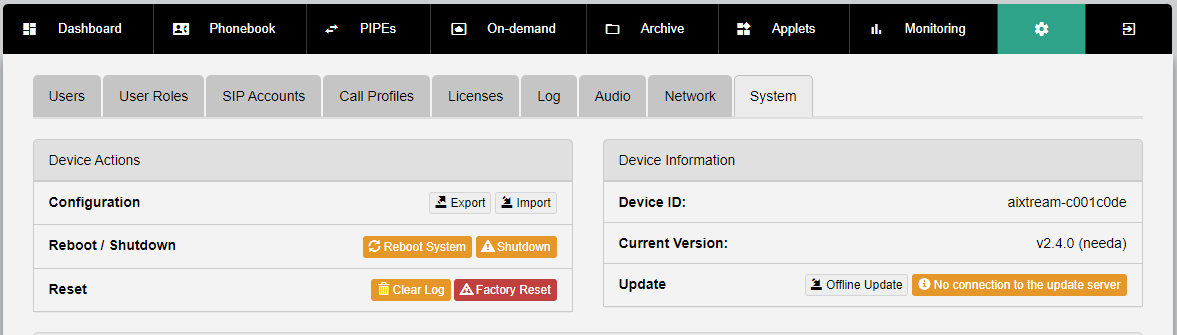
¶ Device actions and information (top)
| Element | Description | Notes |
| Device Actions | ||
| Configuration |
Buttons for
|
|
| Reboot / Shutdown |
|
|
| Reset |
|
|
| Device Information | ||
| Device ID | Displays the identifier of the system. This is the name with which the system identifies itself to other devices (including other hardware audio codecs). | |
| Current Version | Displays the currently installed firmware version of the system. | |
| Update | Displays available firmware updates and starts an update when you click on it. If you have access to multiple different versions, the dropdown selector to the right allows the selection of the desired firmware version. | |
| E | Expert options reminder |
| Expert options should only be changed by authorized users or under supervision by Ferncast personnel. Elements below marked with a blue background are only available when the Expert view is enabled. |
| I | Accordion menus |
| Some options are hidden in an accordion menu. Click on the triangle on the right side of the screen to open the accordion menu. These options are grouped thematically. |
¶ System Configuration
| Element | Description |
| Default/Expert |
Toggles between the Default and Expert view. The toggle is blue if the Expert view is toggled on. Additional options are available while the Expert view is toggled on. These options are marked with a blue background in this table. |
| Hostname | Hostname of the device which identifies the device in the network. |
| Timezone | Sets the time zone of the system time used for time synchronization. |
| WebRemote | |
| Website title | Sets the title of the web UI (centre-top) |
| Website title color | Sets the color of the web UI title (centre-top) |
| Show clock | Activates ("On") or deactivates ("Off") the display of the clock (current system time) in the Dashboard. |
| Session timeout | Sets the time (in minutes) until an inactive user is logged out. |
| Unsafe HTTP headers | Disable X-Frame options. Required for access via some third-party applications, like Session Border Controllers. |
| HTTPS redirect | Activates ("On") or deactivates ("Off") the automatic redirect of HTTP accessrequest to HTTPS. |
| Audio | |
| Profile | Dropdown to select the Low latency mode. This mode minimizes all buffers and audio processing to achieve minimal latency. |
| Audio monitoring mode | Dropdown to enable Mix of mediaplayer inputs. |
| Audio buffer size factor | Adjusts the size of the audio buffer on the software side. |
| Timestamp source |
A dropdown menu for the selection of the source of the timestamp.
|
| Listen-In mode |
Dropdown menu to select the protocol used by the listen-in mediaplayer.
|
| Updater Proxy | Sets proxy access to the system. |
| IP local port range | Sets the range of available IP ports. |
| Archive quota | Sets the amount of storage that should always be kept free. When the actual value drops below the set value, the system automatically deletes the oldest files from the Archive. |
| On-demand job limit | Sets the maximal number of on-demand processing jobs active at the same time. |
| Keys and certificates | |
| SSL public certificate | Displays the used SSL public certificate. |
| SSL private certificate | Displays the used SSL private certificate. |
| SFTP authorized keys | |
| SFTP password | |
| Network license | |
| Hostname | Hostname of the network license server you want to use. |
| Port | Port for connecting to the network license server. |
| HTTPS | Activates ("On") or deactivates ("Off") HTTPS-only connection to the network license server. |
| Secret | Field to enter the access Secret that Ferncast shared with you to access the network license server. |
| SSH root login | Activates ("On") or deactivates ("Off") the SSH access to the system. |
| Debug mode (Backend) | Activates ("On") or deactivates ("Off") the tracking of debug statistics and additional system monitoring. |
| Debug mode (WebRemote) | Activates ("On") or deactivates ("Off") the display of the debug menu. |
| GST debug config | |
| Extra kernel bootargs | Expert only: Field to add additional boot instructions. |
| Icecast server | |
| Service | Activates ("On") or deactivates ("Off") the internal Icecast server. |
| Port | Sets the Icecast input port. |
| Password for user ‘source’ | Sets the password for source user. |
| Password for user ‘admin’ | Sets the password for admin user. |
| Max. input streams | Sets the maximal number of input streams the Icecast server accepts. |
| Max. clients | Sets the maximal number of connected clients the Icecast server accepts. |
| SNMP | |
| SNMPv1 & SNMPv2c | Activates ("On") or deactivates ("Off") SNMPv1 and v2 messaging and traps. |
| SNMPv3 | Activates ("On") or deactivates ("Off") SNMPv3 messaging and traps. |
| Save Changes | Saves all made changes. |