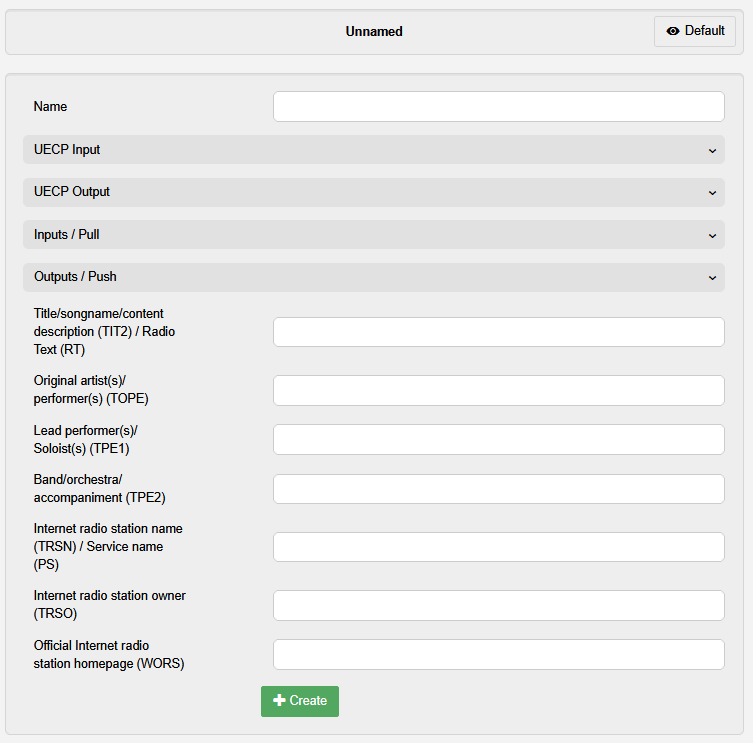
In this menu metadata ingests and output are configured. This must be done before they can be used with the Metadata Inserter audio processing element. Note that they can also be configured in the Metadata Inserter audio processing element as well.
| L | ID3 Tags |
| See the Metadata Tags article for an explanation of available ID3 tags. |
| Element | Description |
|---|---|
| ⇐ Left side | On this side is the option to + Create a new Metadata ingest and the List of available metadata ingests. |
| + Create new metadata | Select this entry to create a new metadata ingest. |
| List of available metadata ingests | Lists all created metadata ingests. Select one to see and change the selected metadata ingest. |
| ⇒ Metadata ingest settings | On this side, you see all settings available for the metadata configuration. The displayed settings are for the currently selected metadata ingest. |
| Element | Description |
|---|---|
| Name | Sets the name for the metadata ingest. Note: Ensure this is a recognizable name, as this is how the metadaata ingest will be identified in other menus and PIPE elements. |
| UECP Input | |
| Protocol |
Dropdown to select the transport protocol for the input.
|
| UECP Port | Sets the receiving port for the UECP data. |
| Multicast group | Sets the IP address of a multicast group to join for UECP reception. |
| Multicast source | Sets the IP address for connecting to a multicast source for UECP reception. |
| Receiving interface | Dropdown to select the network interface for receiving the UECP data. |
| UECP Output | |
| Dropdown |
Selects one of two options:
|
| Inputs / Pull | |
| URL | Sets the URL from which metadata updates are pulled. |
| Update interval | Sets the interval after which an update is pulled. |
| Placeholder |
Defines placeholders for use in the tag fields below. Example: If “HTTP1” is set as a placeholder, you can use “%HTTP1” in any tag field. |
| Outputs / Push | |
| Dropdown | Dropdown to select the metadata API format for the push. |
| QuantumCast MetaPort only | |
| Channel Key | Sets the channel identifier for the MetaPort API. |
| MetaPort Token | Sets the access token for the MetaPort API. |
¶ ID3 Tag fields
Below the metadata ingest configuration, you find a list of all metadata tag fields. These can be manually filled by you to set them as static metadata.
| L | List of ID3 Tags |
| See here for a list and explanation of the most common ID3 tags. |
| E | Full list of ID3 tag fields |
| Only the most commonly used ID3 tags are displayed in the Default view. Toggle on the Expert view to display the full list of ID3 tags. Beware, that list is very long. |